The 'Owner Contract' (a.k.a. Prime Contract) module provides a solid financial foundation for your project, starting directly from your baseline commitment agreement. By setting up your contract and its high-level cost breakdown, you establish a locked financial reference that seamlessly drives your budget, project schedule, and billing workflows from day one.
With the Prime Contracts module, you can:
- Set Up and Lock Prime Contracts: Establish your contract with high-level cost breakdowns using one of two methods:
- Auto-Extraction: Upload a PDF or DOC version of your contract. Linarc automatically extracts and populates the necessary data, allowing you to simply review, confirm, and lock the contract.
- Manual Entry: Manually input the contract details and cost breakdown, then lock the contract.
- Manage the Master Budget: Create your master project budget, distribute the total contract amount, and allocate funds across various work divisions and subcontractors.
- Connect to Your WBS: Link your financial data directly to your Work Breakdown Structure (WBS) for seamless tracking.
- Automate Billing: Streamline your cash flow by automating progress-based billing, pay applications (pay-apps), and invoice processing.
Seamless Budget Generation
Once a Prime Contract is set up, it becomes the definitive, secure reference for all your project's financials, allowing you to accurately build and distribute your master budget.
Schedule and WBS Integration
Move seamlessly from financials to field operations. Linarc can auto-generate a draft task schedule directly from your locked budget. You can use this draft as a baseline to build a comprehensive, WBS-based project schedule, precisely allocating funds from your budget lines to the associated tasks, activities, and deliverables along your planned timeline.
Dynamic SOV and Budget Modifications
Your budget allocations serve as the foundation for generating a planned Schedule of Values (SOV), giving you the flexibility to group specific budget lines into SOV item groups. Because construction is unpredictable, the module also supports comprehensive budget modifications, allowing you to redistribute funds from one item to another as project requirements evolve.
Automated Progress Billing
Streamline your payment cycles and reduce manual entry. Linarc automates the creation of periodic, progress-based billing. By tracking the actual completion percentages of your scheduled field tasks, the system automatically generates accurate payment applications and efficiently processes your invoices.
Contract Budget Setup Workflow
Setting up the project financial involves four steps. The right slider panel in the Contract, Budget, and SOV screens features an auto-updating checklist. As you complete each step in the finance setup, the list tracks your progress and provides direct shortcuts to your next tasks.
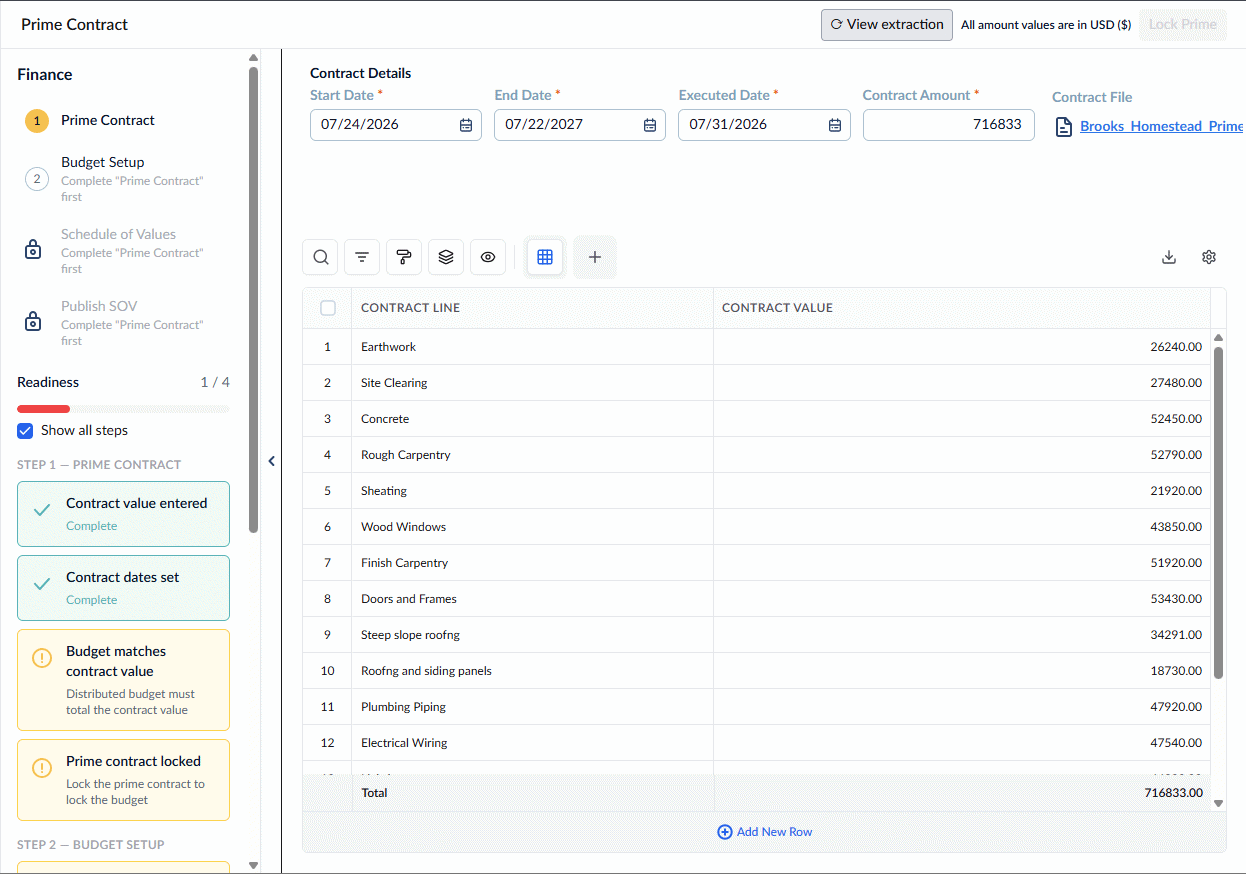
Use the links below to jump to the specific help articles for each step of the Finance Setup workflow:
Step 1 - Creating and Setting up The Prime Contract
Step 2 - Creating and Setting up The Project Budget
- Set up the Master Budget
- Commit Budget Lines to Subcontracts
- Set Up Commitments for Self-Performed Work
- Reconcile Subcontractor Commitments
- Lock Subcontractor Commitments
Step 3 - Set up the Project Schedule of Values (SOV)
Step 4 - Publish the SOV
Was this article helpful?
That’s Great!
Thank you for your feedback
Sorry! We couldn't be helpful
Thank you for your feedback
Feedback sent
We appreciate your effort and will try to fix the article